
展开本页目录
开始前准备什么
- 独立练习目录及Python 3.14;系统与Node依赖以README为准。
- 离线重放无需Key;新请求使用自己的apizt Key,先核对模型权限和当前价格。
- 原创合成材料,不需要登录第三方平台账号。
- 先看文件
- 按步骤操作
- 对照真实结果
- 离线或模型复跑
默认离线重放;包含完整失败尝试与本地检查,不含Key。
1. 核对本例材料与目标文件
既有i18n篇检查占位符;本篇必须编译执行plural/select语法与语言复数分支,不能只做字符串检查。需人工重叠复核。
先下载合成材料在独立目录练习。原始文件、模型输入与验收答案分别保留;本地核对答案不发送给模型。
input.json(节选)
{
  "english": "{count, plural, one {Your cart has # item} other {Your cart has # items}}",
  "locales": [
    "en",
    "zh"
  ]
}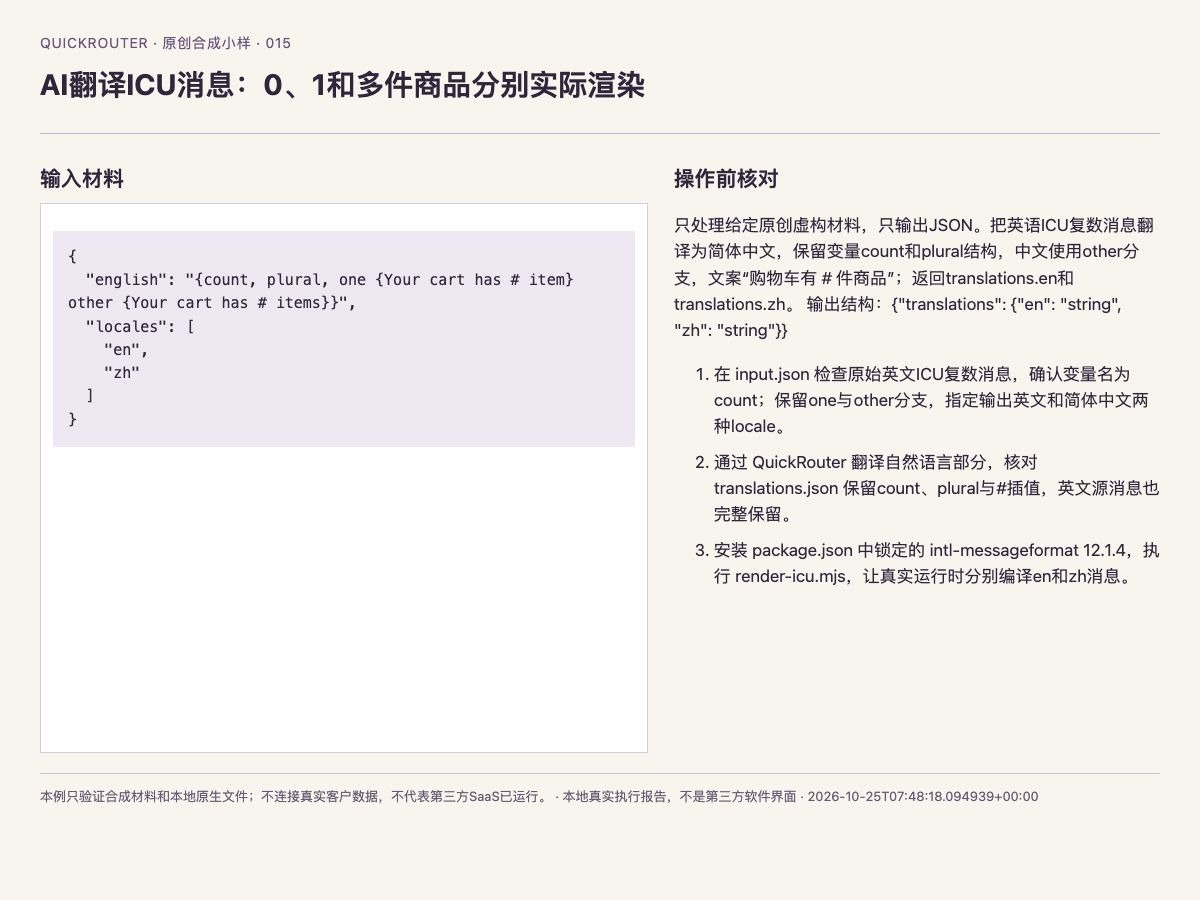
实际输入、原始文件和本例操作约束的浏览器截图
2. 按顺序完成这项具体操作
本次实际使用Python 3.14,依赖版本固定在资料包。需要LibreOffice或Node的案例请先按README安装对应运行时。python run.py读取真实旧响应完成本地处理;只有显式--live才发新请求。
- 1. 在 input.json 检查原始英文ICU复数消息,确认变量名为count;保留one与other分支,指定输出英文和简体中文两种locale。
- 2. 通过 apizt 翻译自然语言部分,核对 translations.json 保留count、plural与#插值,英文源消息也完整保留。
- 3. 安装 package.json 中锁定的 intl-messageformat 12.1.4,执行 render-icu.mjs,让真实运行时分别编译en和zh消息。
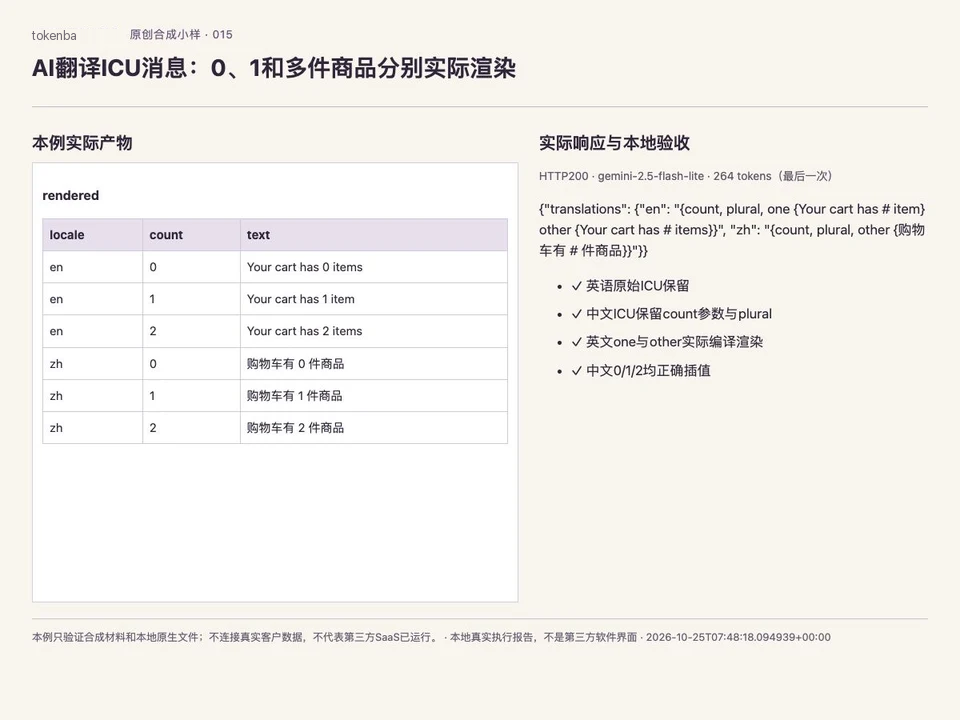
- 4. 打开 rendered-messages.json,逐项查看两种语言在count=0、1、2时的六个实际结果;英文1应使用item,0和2使用items。
- 5. 核对中文三个结果均显示相应数字和商品文案,原始#不残留在成品中;静态搜索占位符只能作为前置检查,实际分支结果以编译渲染为准。
独立练习目录 · 默认仅离线复核
python3 -m venv .venv
source .venv/bin/activate
python -m pip install -r requirements.txt
python run.py
3. 对照真正发送的请求
只处理给定原创虚构材料,只输出JSON。把英语ICU复数消息翻译为简体中文,保留变量count和plural结构,中文使用other分支,文案“购物车有 # 件商品”;返回translations.en和translations.zh。 输出结构:{"translations": {"en": "string", "zh": "string"}}
网页实验台只执行这一步模型字段检查。原生文件写入、坐标/公式/格式回读及负例验收由下载包负责。
request-1.json(图片Base64省略,原文件在下载包)
{
  "model": "gemini-2.5-flash-lite",
  "messages": [
    {
      "role": "system",
      "content": "严格只输出单个JSON对象,不要Markdown代码围栏,不要解释。只处理给定原创虚构材料,只输出JSON。把英语ICU复数消息翻译为简体中文,保留变量count和plural结构,中文使用other分支,文案“购物车有 # 件商品”;返回translations.en和translations.zh。 输出结构:{\"translations\": {\"en\": \"string\", \"zh\": \"string\"}}"
    },
    {
      "role": "user",
      "content": "任务约束(只输出JSON对象,不用代码围栏):\n只处理给定原创虚构材料,只输出JSON。把英语ICU复数消息翻译为简体中文,保留变量count和plural结构,中文使用other分支,文案“购物车有 # 件商品”;返回translations.en和translations.zh。 输出结构:{\"translations\": {\"en\": \"string\", \"zh\": \"string\"}}\n待处理合成材料:\n{\"english\": \"{count, plural, one {Your cart has # item} other {Your cart has # items}}\", \"locales\": [\"en\", \"zh\"]}"
    }
  ],
  "temperature": 0,
  "max_tokens": 1024,
  "provider": {
    "sort": "success_rate"
  },
  "response_format": {
    "type": "json_object"
  }
}4. 查看原生处理代码与实际文件
下面节选来自本次实际执行的workflow.py分支,需要结合完整脚本运行。模型输出不能代替文件解析器或业务验算。
具体产物:package.json、translations.json、render-icu.mjs、rendered-messages.json、result.json、checks.json、preview.html。
workflow.py · 本例分支节选
package = {'private': True, 'dependencies': {'intl-messageformat': '12.1.4'}}
jout('package.json', package)
jout('translations.json', output['translations'])
renderer = "import fs from 'node:fs';import path from 'node:path';import{pathToFileURL}from'node:url';const root=process.env.BATCH100O_NODE_MODULES||path.resolve('node_modules');const{IntlMessageFormat}=await import(pathToFileURL(path.join(root,'intl-messageformat/index.js')).href);const messages=JSON.parse(fs.readFileSync('translations.json','utf8'));const rows=[];for(const locale of['en','zh'])for(const n of[0,1,2]){const f=new IntlMessageFormat(messages[locale],locale);rows.push({locale,count:n,text:f.format({count:n})})}console.log(JSON.stringify(rows));"
(folder / 'render-icu.mjs').write_text(renderer)
artifacts.append('render-icu.mjs')
proc = subprocess.run(['node', 'render-icu.mjs'], cwd=folder, text=True, capture_output=True, timeout=30, check=True)
rows = json.loads(proc.stdout)
jout('rendered-messages.json', rows)
en = {r['count']: r['text'] for r in rows if r['locale'] == 'en'}
zh = {r['count']: r['text'] for r in rows if r['locale'] == 'zh'}
check('英文one与other实际编译渲染', en[1] == 'Your cart has 1 item' and en[0] == 'Your cart has 0 items' and (en[2] == 'Your cart has 2 items'))
check('中文0/1/2均正确插值', all((str(n) in zh[n] and '#' not in zh[n] and ('商品' in zh[n]) for n in [0, 1, 2])))
result = {'runtime': 'intl-messageformat 12.1.4', 'rendered': rows}
5. 对照真实结果和检查表
实测2026-10-25T07:48:18.094939+00:00,HTTP200;请求gemini-2.5-flash-lite,返回gemini-2.5-flash-lite。本次5/5项检查通过,指本例执行及验收机制通过,不代表所有模型字段零误差。
最后一次返回用量264tokens;1份尝试记录的已知用量合计264。失败记录保留,用量缺失不按0计,本文不推算实际金额。
| 实际检查 | 结果 |
|---|---|
| 真实apizt API响应HTTP200 | 通过 |
| 英语原始ICU保留 | 通过 |
| 中文ICU保留count参数与plural | 通过 |
| 英文one与other实际编译渲染 | 通过 |
| 中文0/1/2均正确插值 | 通过 |
- 实际检查
- 真实apizt API响应HTTP200
- 结果
- 通过
- 实际检查
- 英语原始ICU保留
- 结果
- 通过
- 实际检查
- 中文ICU保留count参数与plural
- 结果
- 通过
- 实际检查
- 英文one与other实际编译渲染
- 结果
- 通过
- 实际检查
- 中文0/1/2均正确插值
- 结果
- 通过
result.json · 原生处理后实际结果
{
  "runtime": "intl-messageformat 12.1.4",
  "rendered": [
    {
      "locale": "en",
      "count": 0,
      "text": "Your cart has 0 items"
    },
    {
      "locale": "en",
      "count": 1,
      "text": "Your cart has 1 item"
    },
    {
      "locale": "en",
      "count": 2,
      "text": "Your cart has 2 items"
    },
    {
      "locale": "zh",
      "count": 0,
      "text": "购物车有 0 件商品"
    },
    {
      "locale": "zh",
      "count": 1,
      "text": "购物车有 1 件商品"
    },
    {
      "locale": "zh",
      "count": 2,
      "text": "购物车有 2 件商品"
    }
  ]
}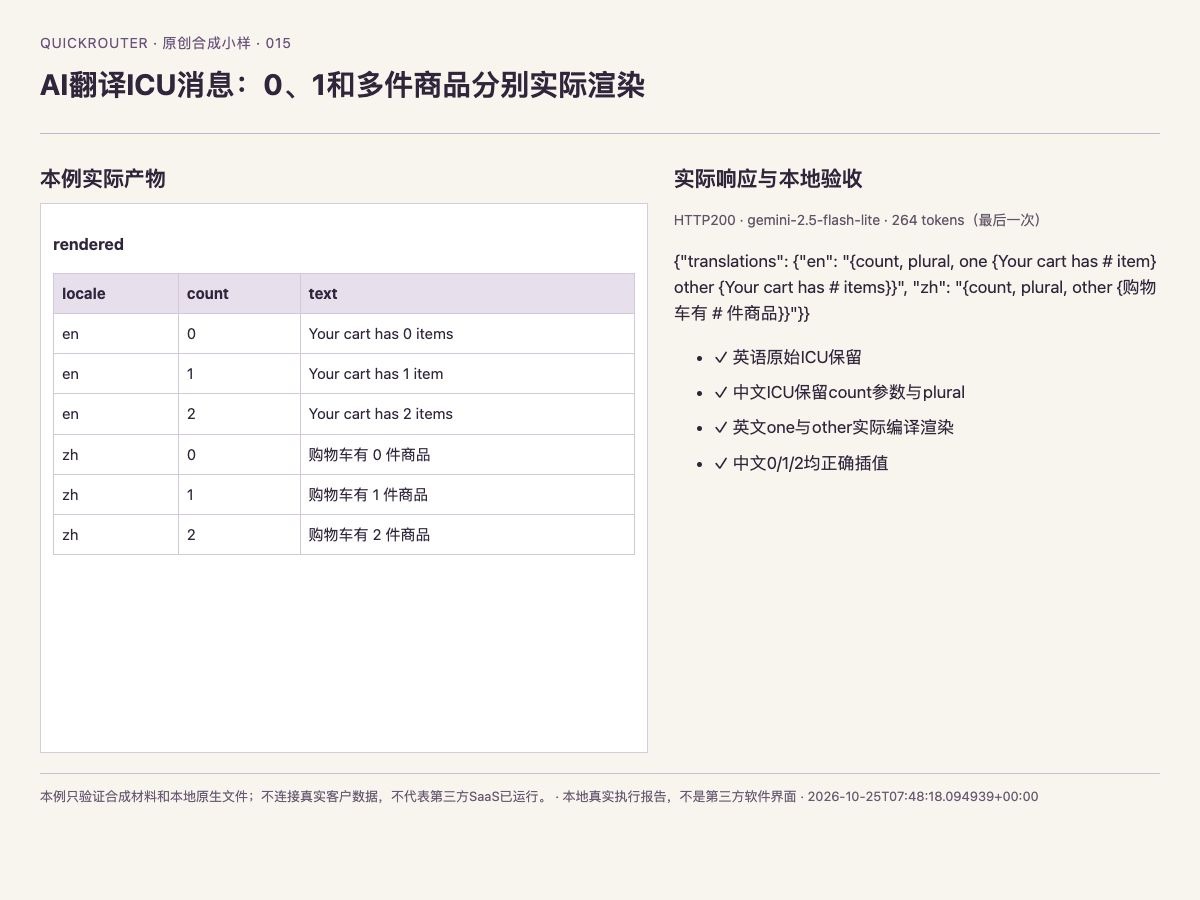
本例实际产物与原始响应的浏览器截图;本地检查和模型答案分开记录
6. 替换输入前,先确认这些边界
本例只验证合成材料和本地原生文件;不连接真实客户数据,不代表第三方SaaS已运行。
修改材料后应重新制定事实断言和反例。识别错误率、混淆矩阵或拒答类教程允许保留模型实际错误;检查通过指计算和处理正确。没有调用视频模型。
怎样确认已经完成
- 真实apizt API响应HTTP200
- 英语原始ICU保留
- 中文ICU保留count参数与plural
- 英文one与other实际编译渲染
- 中文0/1/2均正确插值
常见问题
AI ICU plural 翻译怎么开始?
在 input.json 检查原始英文ICU复数消息,确认变量名为count;保留one与other分支,指定输出英文和简体中文两种locale。按本页顺序继续,先用下载包离线重放,再替换自己的材料。
网页试跑和下载包有什么区别?
网页只复跑模型字段,不生成全部原生文件;资料包包含实际原生处理和本地验收。
这次通过结果适用于其他材料吗?
本例只验证合成材料和本地原生文件;不连接真实客户数据,不代表第三方SaaS已运行。